
The image could not be loaded.
01
Upload Your Image
Upload the JPG, PNG, or WebP image containing the logo you want to remove. Files up to 10 MB are supported.
 WatermarkGemini
Remove unwanted brand logos, badges, and logo marks from images you own or are authorized to edit. WatermarkGemini's AI logo remover cleans the marked area while preserving nearby colors and details—no Photoshop or complicated editing required.

The image could not be loaded.
The image could not be loaded.

The image could not be loaded.
Drop an image or MP4 video here or click to browse
Your file stays on this device until you sign in and upload.
Open workspaceYou do not need Photoshop or advanced editing skills. Use WatermarkGemini as an online logo eraser to clean an unwanted logo from your image in just a few steps.
The image could not be loaded.
Upload the JPG, PNG, or WebP image containing the logo you want to remove. Files up to 10 MB are supported.

The image could not be loaded.
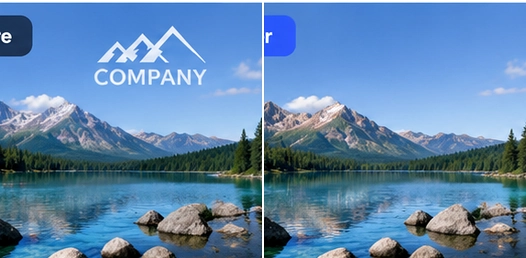
Start the removal process. The AI processes the visible logo area and works with surrounding colors and image details to create a cleaner result.

The image could not be loaded.
Compare the before-and-after result. Once you are satisfied with the edit, download your cleaned image through the temporary result link.
Logos do not always sit on simple backgrounds. They appear on packaging, detailed scenery, reflective surfaces, clothing, and textured materials where basic blur or cropping can leave obvious damage. WatermarkGemini helps you remove logos from images with AI while keeping the surrounding scene visually consistent.
The image could not be loaded.
Old branding, supplier logos, or company marks can make otherwise useful product photos difficult to reuse. Instead of reshooting the product or manually cloning pixels, use our AI logo remover to remove visible brand marks while keeping the product shape, lighting, colors, and surrounding background intact. Perfect for rebranding, e-commerce listings, catalog updates, product presentations, and refreshed marketing assets.
The image could not be loaded.
blurred logo can be almost as distracting as the original mark. WatermarkGemini works on the logo area and reconstructs it using nearby visual information, helping you remove a logo from an image without blur, pixelation, or aggressive cropping. It is especially useful when the logo sits over scenery, patterns, textures, or other detailed backgrounds where a simple blur would be easy to notice.

The image could not be loaded.
Logos on bottles, labels, packaging, glossy materials, and curved surfaces can be difficult to erase manually because reflections, shadows, and edges make editing patches obvious. Our AI logo remover analyzes the surrounding area and works to preserve colors, reflections, edges, and surface details as it removes the unwanted mark—helping you get cleaner results from more challenging product photos.
Start with the cleanup workflow that best matches your image.

Remove an image background with a focused cleanup workflow.
Explore tool
Erase unwanted objects and visual clutter from approved images.
Explore tool
Clean captions, labels, and unwanted text overlays.
Explore toolReview visible logos and brand marks on approved images.
Explore tool
Compare an approved image with a visible ChatGPT-style mark.
Explore tool
Clean a visible Gemini watermark without changing the image crop.
Explore tool
Clear date and timestamp overlays from images you can edit.
Explore tool
Review a visible signature cleanup before you download.
Explore toolPractical guides for cleaner, more polished images.
Find quick answers about how to remove logos from images online, preserve image quality, handle product photos and complex backgrounds, and use our AI logo remover safely across different devices.
Upload your JPG, PNG, or WebP image to WatermarkGemini and start the logo removal process. The AI processes the logo area and reconstructs the surrounding background. Review the result, then download the cleaned image when you're satisfied.
Yes. Instead of simply blurring the logo, an AI logo remover can reconstruct the selected area using nearby colors, textures, and visual details. Results are usually best when the logo is small and the surrounding background provides enough information to rebuild the covered area.
Yes. WatermarkGemini works directly in a web browser, so you can remove a logo from a photo online on compatible iPhone, Android, tablet, or desktop browsers without installing Photoshop or other desktop editing software.
It depends on who owns the image and how you plan to use it. You should only remove logos from images you own or have permission to edit. Removing trademarks, copyright notices, or branding from someone else's content for unauthorized commercial use may violate applicable rights or licensing terms.
Yes, if you own the product image or are authorized to modify it. This can be useful for approved rebranding, replacing outdated packaging, refreshing product listings, or preparing new marketing assets without reshooting the original photo.
WatermarkGemini supports JPG, PNG, and WebP images up to 10 MB. Upload the image containing the unwanted logo and review the processed result before downloading.
Large logos, transparent marks, fabric patterns, reflections, and detailed backgrounds can be more difficult to reconstruct. If the first result looks uneven, try using a clearer source image or processing a more precise logo area. Complex images may require another pass for a cleaner result.
Upload an image and try WatermarkGemini for free.