
The image could not be loaded.
01
Upload Your Gemini Image
Upload a JPG, PNG, or WEBP image containing the visible Gemini watermark you want to remove.
 WatermarkGemini
Remove the visible Gemini watermark from your images in seconds. WatermarkGemini cleans the unwanted Gemini mark while keeping the surrounding image and original composition as natural as possible. Upload your image, remove the visible watermark, preview the result, and download your clean image—without manually cropping or editing the marked corner.

The image could not be loaded.

The image could not be loaded.

The image could not be loaded.
Drop an image or MP4 video here or click to browse
Your file stays on this device until you sign in and upload.
Open workspaceRemove a visible Gemini watermark in three simple steps without complicated photo editing.
The image could not be loaded.
Upload a JPG, PNG, or WEBP image containing the visible Gemini watermark you want to remove.

The image could not be loaded.
Start processing and let WatermarkGemini clean the marked area while preserving the surrounding colors, textures, and image details.

The image could not be loaded.
Compare the original and processed image, check the cleaned corner, and download the result when you're satisfied.
A visible Gemini watermark often sits in the corner of an otherwise finished image. Removing it should not mean sacrificing your composition, image details, or editing time.

The image could not be loaded.
Cropping out a corner watermark can cut away important subjects, backgrounds, or space you planned to use for text. WatermarkGemini removes the visible Gemini mark from the image instead, helping you keep the original frame and composition intact.

The image could not be loaded.
Simply blurring or covering a watermark can leave an obvious patch behind. WatermarkGemini cleans the visible mark while restoring the surrounding area so backgrounds such as skies, walls, textures, illustrations, and product surfaces look more natural.
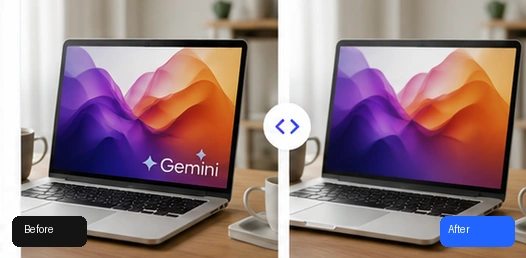
The image could not be loaded.
You shouldn't need Photoshop, clone tools, or manual pixel editing just to clean a small Gemini watermark. Upload your image, process the visible mark online, preview the result, and download a cleaner version ready for presentations, social posts, product visuals, and other projects.

The image could not be loaded.
Use WatermarkGemini directly in your browser. Sign in with Google to use your free processing balance and earn additional free credits through daily check-in. Uploaded images and processed results stay in private storage and are scheduled for automatic deletion after 24 hours.
Start with the cleanup workflow that best matches your image.

Remove an image background with a focused cleanup workflow.
Explore tool
Erase unwanted objects and visual clutter from approved images.
Explore tool
Clean captions, labels, and unwanted text overlays.
Explore tool
Review visible logos and brand marks on approved images.
Explore tool
Compare an approved image with a visible ChatGPT-style mark.
Explore tool
Clean a visible Gemini watermark without changing the image crop.
Explore tool
Clear date and timestamp overlays from images you can edit.
Explore tool
Review a visible signature cleanup before you download.
Explore toolPractical guides for cleaner, more polished images.
Learn what the tool can remove, which files it supports, and how your images are handled.
Upload your Gemini image to WatermarkGemini, sign in with Google, start processing, and preview the cleaned area. If the result looks right, download the processed image.
Yes. WatermarkGemini works directly in your browser, so you can remove a visible Gemini watermark from supported image files without installing traditional photo-editing software.
Yes. WatermarkGemini is free to use for supported images. Google sign-in is required before processing starts.
Google has started rolling out a Media watermark setting that allows visible watermarks to be turned off for supported Gemini and Flow content. Availability can vary by product, account, region, and local requirements. If the setting is unavailable or you already have an exported image with a visible mark, WatermarkGemini can be used to clean the visible watermark afterward.
WatermarkGemini is designed for visible Gemini marks appearing on image content. It does not claim to remove invisible provenance technologies such as SynthID or C2PA credentials.
No cropping is required by the WatermarkGemini workflow. The tool processes the marked area instead of cutting away the corner of your image.
WatermarkGemini is designed to preserve the surrounding image while cleaning the visible mark. Results can vary depending on the watermark area and background complexity, so always check the preview before downloading.
WatermarkGemini supports one JPG, PNG, or WEBP image up to 10 MB at a time.
Yes. You can choose an image before signing in, but Google sign-in is required before processing begins.
No. WatermarkGemini targets the visible image watermark only. It does not claim to remove Gemini's invisible SynthID watermark or other provenance information.
No. WatermarkGemini is an independent image-cleanup tool and is not affiliated with or endorsed by Google.
Upload an image and try WatermarkGemini for free.